
Quick summary
#Individuals who already have an approved application or existing record use G-1145 to request a follow-up action described in the official instructions, as described in the Application for Naturalization guide.
When you need the agency to take follow-up action on an already approved case
Include it with your application package and follow official instructions for submission.
Names, dates of birth, and passport details on other forms Program checklist requirements Supporting documents and translations
Overview (What is Form G-1145?)
#By providing a simple and cost-free method to receive notifications, it enhances the communication process between USCIS and applicants, ensuring that individuals are promptly informed about the status of their submissions.
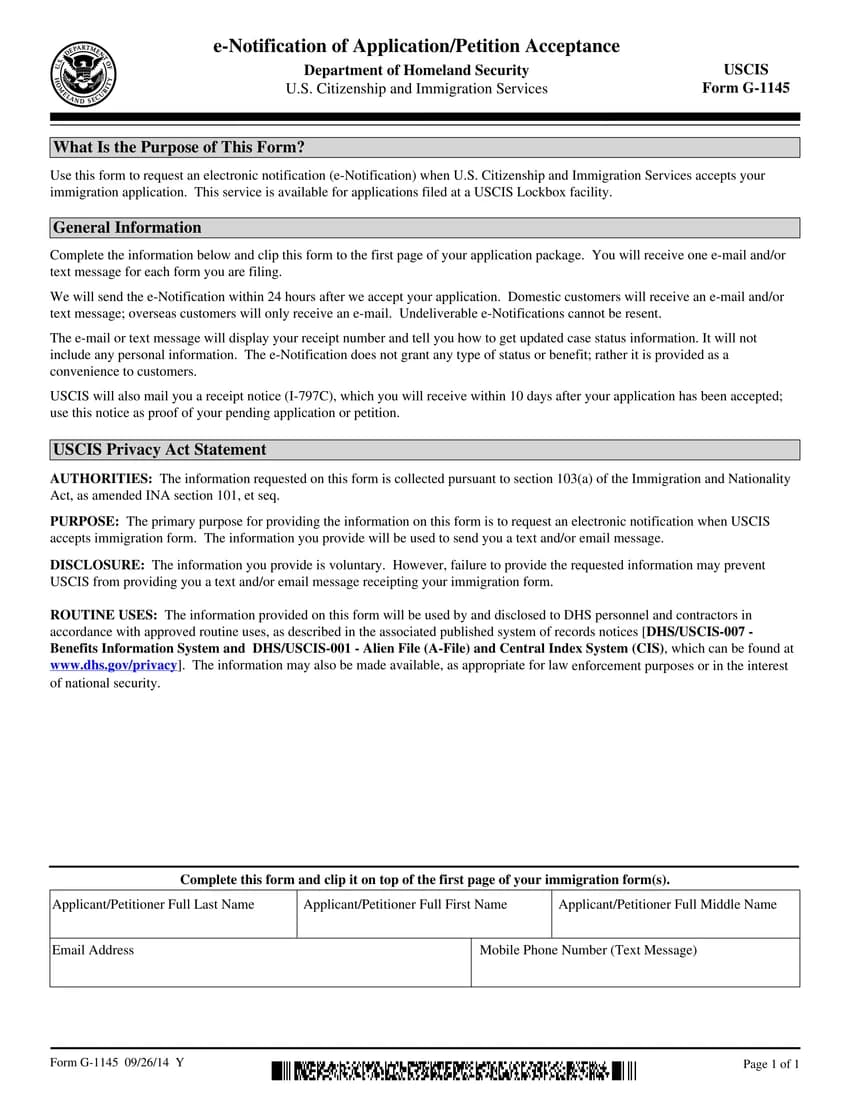
First page of G-1145 form
Source: G-1145 PDF
Context and workflow
#Processing time for G-1145 varies by case type and current workload — always check the official USCIS processing time tool.
Why this matters
- This form acts as a cross-check point: details here must match other forms and supporting documents.
- Small mismatches inside G-1145 (or between G-1145 and supporting evidence) can force rework later in processing.
Where it fits in the workflow
- Supporting document for initial application submission
- Receipt Notice (a related form)
- G-1145 is commonly filed alongside Form I-130, Form I-485, Form I-765.
Who uses it
Individuals who already have an approved application or existing record use G-1145 to request a follow-up action described in the official instructions, as described in the Application for Naturalization guide.
When it is used
- When you need the agency to take follow-up action on an already approved case
- To request action related to an existing approval or record, as described in the instructions
- After a prior approval when a specific agency action is required
Failure prevention (What causes Form G-1145 rejections?)
#Technical rejections
- Not attaching the form to the front of the application or petition
- Ensure form edition is current
Substantive weaknesses
- Submitting the form for applications not filed at a USCIS Lockbox location
- Supporting documents are organized and relevant
- To avoid incomplete or incorrect information: Double-check all fields and include every required document per instructions.
- To avoid invalid or unreachable email or phone number: Provide working email and phone; typos prevent receipt of notification.
- To avoid placing g-1145 in wrong location in packet: Clip G-1145 to the first page of the application; USCIS may miss it if buried.
What it asks for (What does Form G-1145 ask for?)
#- Request for electronic notification of form acceptance
- The specific follow-up action you are requesting (what you want the agency to do).
- Prior case identifiers (such as receipt/notice details), if available.
- Supporting documents tied to the follow-up action you are requesting.
- Contact information for receiving notifications (email and/or phone number)
Sources for this section
What you need (What do you need for Form G-1145?)
#- The current edition of G-1145
- Accurate email address and phone number for receiving notifications
- The specific edition of Form G-1145 as required by USCIS
Checklist (What is the Form G-1145 checklist?)
#- To begin, ensure you download the most recent version of Form G-1145 along with its instructions from the official USCIS website.
- Review the G-1145 instructions for the follow-up action this form covers
- Complete all required sections of G-1145
- Ensure that all pages are from the same current edition of Form G-1145.
- Ensure you sign and date Form G-1145, and submit it along with all necessary supporting documents.
Sources for this section
Fees
#There is no USCIS filing fee for Form G-1145.
Form sections (What sections does Form G-1145 have?)
#Personal Information
Applicant identification.
- Full name and A-Number if applicable
- Date of birth and nationality
- Current address and contact
Eligibility
Basis for the application.
- Category or classification claimed
- Supporting evidence type
- Dates establishing eligibility
Supporting Documents
Required attachments.
- Identity and status documents
- Category-specific evidence
- Fee payment or waiver request
Key terms
#- e-Notification
- An electronic message sent to notify acceptance of an application.In this form: Used to inform applicants of their form's acceptance by USCIS.
Strategy tips
#Mistake severity
#| Mistake type | Severity | How to avoid |
|---|---|---|
| Incomplete or incorrect information | Delay | Double-check all fields and include every required document per instructions. |
| Invalid or unreachable email or phone number | Delay | Provide working email and phone; typos prevent receipt of notification. |
| Placing G-1145 in wrong location in packet | Delay | Clip G-1145 to the first page of the application; USCIS may miss it if buried. |
| Assuming G-1145 expedites or tracks case status | Delay | G-1145 only provides initial receipt notification; use USCIS Case Status for updates. |
Examples (What are examples for Form G-1145?)
#- An applicant submitting Form I-130 along with Form G-1145 at a USCIS Lockbox location received timely electronic notifications of acceptance, ensuring they were informed promptly.
Common misconceptions (What misconceptions surround Form G-1145?)
#- Some applicants assume that submitting Form G-1145 will expedite their application process; however, it only provides electronic notifications of acceptance.
- G-1145 has no separate filing fee, but it is not optional paperwork — failing to include it when required can delay or jeopardize the underlying case.
- G-1145 can be rejected before substantive review for technical errors such as “Not attaching the form to the front of the application or petition.”
- A complete G-1145 can still be denied on the merits — issues like “Submitting the form for applications not filed at a USCIS Lockbox location” are evaluated by the reviewer even when paperwork is clean.
- Submitting G-1145 is the start of the process — applicants should expect follow-up steps such as “Receipt Notice (a related form).”
- Filing G-1145 is not the same as approval — adjudicators independently review eligibility, evidence, and admissibility before deciding the case.
Edge cases and variations
#- If you are asked to submit or update G-1145, treat it as a package update: check every place the same details appear and keep them consistent.
Scenarios
#An applicant files the application with all required supporting documents and the correct fee.
Application accepted. Biometrics may be scheduled. Case proceeds to adjudication.
Follow the evidence checklist for your category. Missing documents trigger RFEs or denial.
An applicant files before the eligibility window (e.g., I-751 outside the 90 days before conditional residence expires).
Application rejected. Fee returned. Must refile when eligible.
Verify eligibility dates carefully. Filing too early is as problematic as filing late.
An applicant forgets to sign the form.
Application rejected. Must resubmit with signature. Unsigned forms are not accepted.
Sign and date the form. Review the signature block before mailing.
Key differentiators
#- Unlike Form I-797C: Form G-1145 provides electronic notifications, while Form I-797C is a mailed receipt notice.
- Unlike Form I-130: Petition for Alien Relative: Filed together: Receive email/text when petition is accepted (General application pathway)
- Unlike Form I-485: Application to Register Permanent Residence or Adjust Status: Filed together: Receive email/text when application is accepted (General application pathway)
- Unlike Form I-765: Application for Employment Authorization: Filed together: Receive email/text when EAD application is accepted (General application pathway)
Why it matters
#What happens after you submit
#- Receipt Notice (a related form)
- Attend biometrics appointment (fingerprints, photo, and signature) if applicable
- Receive electronic notification of acceptance
Verification
#This guide is based on official USCIS instructions for G-1145 and is updated with changes in form editions or filing rules. Always confirm current requirements on the official USCIS website.
Resources
#Free United States planning tools
#Itemize the government fees that go alongside Form G-1145.
United States eligibility checker
See which United States visas your profile fits before you finalize Form G-1145.
United States processing times
Get the typical wait time for the visa associated with Form G-1145.
United States interview practice
Practice United States interview questions if your filing route includes one.