Overview — India e-Business visa
#
The e-Business Visa is for defined commercial purposes, not employment. It allows multiple entries over a year, and you apply through the official Form e-Visa Application system.
Purpose
Use the e-Business Visa for legitimate commercial reasons: meetings, trade discussions, or sales activity.
This visa is only for short-term business travel. It does not let you work in India or get paid by an Indian entity.
Key eligibility points:
- Travel must be for business activities like meetings, trade, or sales.
- Employment is not allowed.
- Activities must fit the Business Visa scope, not the Employment Visa.
If your plans differ, review other categories: e-Tourist Visa, e-Medical Visa, e-Conference Visa, or the regular Employment Visa. Each visa serves a distinct function, and the wrong category can cause entry problems.
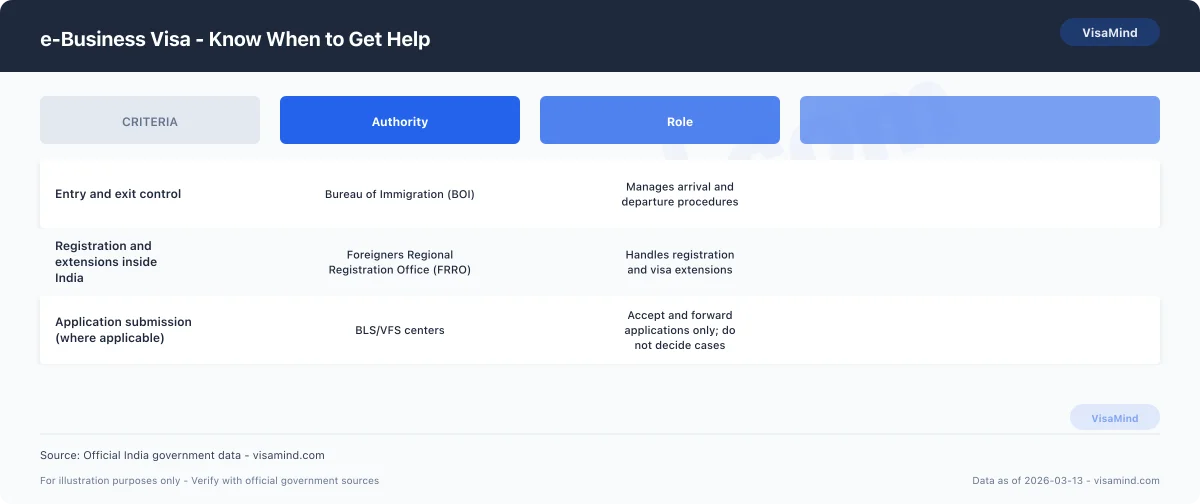
Border control officers with the Bureau of Immigration (BOI) assess entry. Inside India, the Foreigners Regional Registration Office (FRRO) manages registration if needed.
Typical business activities
Your activities must stay within standard commercial engagement.
Common examples:
- Attending business meetings
- Participating in trade discussions
- Conducting sales-related visits
- Exploring commercial partnerships
You can negotiate contracts or discuss services. You can’t take a salaried role or perform ongoing work for an Indian employer.
Here’s a quick comparison of e-Business Visa versus other e-Visas:
| Visa Type | Primary Purpose | Employment Allowed |
|---|---|---|
| e-Business Visa | Meetings, trade, sales | No |
| e-Tourist Visa | Tourism and personal travel | No |
| e-Medical Visa | Medical treatment | No |
| e-Conference Visa | Conference participation | No |
| Employment Visa | Work for an employer in India | Yes |
If you plan to work, the Employment Visa is required.
Validity summary
The e-Business Visa is valid for one year.
It allows multiple entries during the validity period, so you can travel in and out of India for business activities without reapplying.
Make sure that:
- Each visit is for permitted business purposes.
- You don’t take up employment.
- Travel stays within the one-year visa window.
You apply online through the e-Visa Application system.
For current fees in ₹ and procedural updates, refer to the Government of India’s e-Visa resources. FRRO handles in-country stay matters; BOI manages entry and exit.
What Applicants Get Wrong
#Most rejections result from avoidable form errors and mismatched details. These are under your control—submit complete, consistent information that matches your passport and supporting documents.
Common application errors
Leaving fields blank or entering details that don’t match your passport can lead to rejection. Even minor spelling or date differences can cause problems.
Choosing the wrong visa category is another frequent issue. Some applicants confuse the Business Visa with the e-Tourist, e-Conference, e-Medical, or Employment Visa, then provide details that don’t fit.
Inconsistent answers across sections also create trouble. If your travel details or personal data differ from page to page, the system flags it.
| Error Type | Why It Causes Rejection |
|---|---|
| Incomplete fields | Application considered unfinished |
| Mismatched passport details | Identity cannot be verified |
| Conflicting answers | Information appears unreliable |
| Wrong visa category selected | Purpose does not match visa type |
You’re responsible for every entry, even if someone else fills out the form.
How to avoid rejections
Enter your passport details exactly as shown. Copy names, numbers, and dates directly—no abbreviations or formatting changes.
Before submitting, review each section for:
- Spelling accuracy
- Matching dates in all fields
- Consistent personal information
- Correct visa category
If you’re conducting business, confirm you selected the Business Visa category.
After approval and arrival, you may have to deal with the Foreigners Regional Registration Office (FRRO) for registration or extensions in India. Mistakes in your application can complicate later dealings with FRRO.
Careful review helps prevent unnecessary refusals and delays.
Conditions of Stay
#Your e-Business Visa permits multiple entries within its validity, but limits how long you can stay in India each visit. You can’t extend or change this visa while in India.
Strict limits apply to employment and conversion to other categories.
Duration and entries
The e-Business Visa is valid for one year from the date granted. During that year, you can enter India multiple times.
Each stay is capped. You can’t remain for more than 180 consecutive days per visit.
| Feature | Rule |
|---|---|
| Visa validity | 1 year |
| Number of entries | Multiple |
| Maximum stay per visit | 180 days (continuous stay limit) |
If you leave before 180 days, you can re-enter as long as your visa is valid. The one-year window doesn’t reset after each entry.
BOI monitors entry and exit. You must follow the 180-day limit every visit.
Work and conversion restrictions
The e-Business Visa is for business activities only. It doesn’t authorize employment in India.
If your purpose changes and you plan to work for an Indian employer, you must apply for an Employment Visa. You can’t convert an e-Business Visa to an Employment Visa while in India.
The e-Business Visa is non-convertible. You can’t switch it to:
- Business Visa (regular sticker)
- e-Tourist, e-Conference, or e-Medical Visa
- Any other category
If you need a different visa, submit a new application or apply from outside India.
FRRO does not approve category changes for e-Visas.
Extension rules
The e-Business Visa is non-extendable. You can’t extend it beyond the original one-year period.
FRRO handles extensions for other visa types, but not this one. Even if you have ongoing business, FRRO won’t extend this category.
You must leave India before:
-
Reaching 180 continuous days in a visit, or
-
The one-year visa expires
If you need a longer stay or different status, exit India and submit a new application under the right category.
Check your visa details after approval. The grant conditions govern your stay.
Fees and Processing Times — India business e-Visa
#You pay a fixed government fee and wait for a standard processing period. Timelines vary by category and location.
Application fee
The eVisa fee is paid online using a credit/debit card or payment wallet.
This applies to the e-Business Visa category. Other types—e‑Tourist, e‑Medical, e‑Conference, or Employment Visa—may have different fees.
| Item | Amount |
|---|---|
| India Business e‑Visa fee | See official Indian e-Visa website for current fee |
The fee is paid during the online application. Processing won’t begin until payment is made.
If you need registration or services inside India, the FRRO handles those. BOI manages entry and exit.
Standard processing time
Business days exclude weekends and government holidays. Apply early to avoid last‑minute issues.
Processing starts after you submit your application and pay the fee. If authorities need extra verification, delays can happen.
If you’re applying for another category, such as the e‑Conference or e‑Medical Visa, check the timeline for that specific visa.
Variations and verification
Processing times depend on:
- The visa category
- The processing location
- Any case‑specific review
If applying from outside India, centers like BLS or VFS may collect your application, but they don’t make the decision. The Indian authority reviews and issues the e‑Visa.
If you’re already in India and need post‑arrival services, the FRRO manages registration and compliance.
Processing policies can change without notice.
Who Can Apply
#You must meet passport and category requirements before submitting your e‑Visa Application. Passport type and validity are key. Some applicants need a different visa—Business Visa, e‑Conference Visa, e‑Tourist Visa, e‑Medical Visa, or Employment Visa.
Passport requirements
Your passport needs at least six months validity from your planned arrival. If it doesn’t, you’re not eligible for the India e‑Business Visa.
Check your passport before applying. Renew it if it’s expiring soon.
Checklist:
- Ordinary passport (not diplomatic or official)
- Validity of at least six months
- Passport details match exactly what you enter in the application
If you enter on an e‑Business Visa, BOI handles immigration clearance at entry. FRRO manages registration and visa services inside India.
| Requirement | Must Meet for e‑Business Visa |
|---|---|
| Passport validity | Minimum 6 months |
| Passport type | Ordinary passport |
| Diplomatic/Official passport | Not eligible |
Excluded passport holders
Holders of Diplomatic or Official Passports can’t apply for the e‑Business Visa. The online system won’t accept these categories.
If you have one of these, use the appropriate process outside the e‑Visa system. Only ordinary passport holders are eligible for the standard e‑Visa Application.
Applying under the wrong passport type leads to refusal and delays.
Confirm your passport classification before starting.
Check your eligibility category
Before starting your e‑Visa Application, review the eligibility for your category. The e‑Business Visa is different from other Indian visa types.
Make sure your travel purpose fits the right visa:
- Business Visa (regular)
- e‑Conference Visa
- e‑Tourist Visa
- e‑Medical Visa
- Employment Visa
Each has unique conditions. The wrong category can mean refusal or problems at entry.
If your travel purpose doesn’t clearly fit business activities allowed under the e‑Business Visa, review Government of India guidance first. This helps avoid delays and aligns your application with your actual plans.
When to Consult a Professional
#You can complete the Form e-Visa Application yourself in many cases. For more complicated situations, professional guidance helps prevent mistakes and reduces the risk of refusal, as submitting an India e-Business Visa application does not guarantee approval.
When self-preparation is enough
You can usually handle your India e-Business Visa application yourself if your case is simple and well documented.
Professional help isn't always necessary.
You may not need assistance when:
- You clearly qualify for an e-Business Visa and your travel fits permitted business activities.
- You've previously obtained an Indian e-Tourist Visa, e-Medical Visa, or e-Conference Visa without issues.
- There's no history of visa refusals or overstays in India.
- Your passport details and supporting documents are accurate and consistent.
It's important to know which authority handles each stage:
| Authority | Role |
|---|---|
| FRRO (Foreigners Regional Registration Office) | Handles registration and visa extensions inside India |
| Bureau of Immigration (BOI) | Manages entry and exit at ports of entry |
| BLS/VFS centers | Accept and forward applications but do not make decisions |
If your plans involve only short-term business activities and nothing resembling employment, self-preparation typically works.
When to get expert help
Some situations call for professional assistance.
You should seek help if:
- Your activities might fall under an Employment Visa rather than a Business Visa.
- You've previously received a visa refusal.
- You overstayed a prior Indian visa.
- You need to convert, extend, or regularize status through the FRRO inside India.
- You're unsure whether your visit fits better under an e-Conference Visa or another visa category.
Confusion between visa types happens often. Business activities that look like long-term work may require a different visa.
If your case involves compliance questions, prior immigration history, or FRRO procedures, professional advice can help you present accurate information and avoid preventable errors.
Application Process
#You must use the current official form and follow Bureau of Immigration instructions exactly.
Complete every required section, sign the application, and submit it with supporting evidence.
Download forms and instructions
Start by downloading the current e-Business Visa application form and the official instructions from the Bureau of Immigration.
Don't rely on outdated copies saved on your device.
Review the instructions before you begin. Forms and procedural guidance change; you have to use the version in effect when you apply.
Confirm you're using the correct visa category. The e-Business Visa is not the same as the e-Tourist Visa, e-Medical Visa, or e-Conference Visa. Select the right option in the Form e-Visa Application system.
Use this checklist:
| Item | What to Confirm |
|---|---|
| Form version | Most recent version from Bureau of Immigration |
| Visa category | e-Business Visa selected (not Employment Visa or other e-Visa type) |
| Instructions | Read fully before completing the form |
If you plan to register or seek an extension inside India, the Foreigners Regional Registration Office (FRRO) handles those processes.
Entry and exit are managed by the Bureau of Immigration.
Complete and sign the application
Fill out all required sections of the e-Visa Application accurately.
Don't leave mandatory fields blank.
Enter your personal details exactly as they appear in your passport.
Inconsistent information can delay processing or lead to rejection.
Answer every question truthfully and completely.
The system requires specific information, and you have to provide it as requested.
After completing the form, review each page carefully.
Check that:
- Your name matches your passport
- Your visa category is correct
- All required fields are completed
Sign the application as instructed.
An unsigned application is incomplete and won't move forward.
Submit with evidence
Submit your completed and signed application with all required supporting evidence listed in the official instructions.
Don't omit documents identified as mandatory.
Organize your evidence clearly.
Follow the format and submission steps provided in the e-Visa Application system.
Use this submission checklist:
| Requirement | Action |
|---|---|
| Completed form | All required sections filled |
| Signature | Signed as instructed |
| Supporting evidence | Included as specified in official guidance |
Submit through the official channel designated by the Bureau of Immigration.
If you later require registration or visa services within India, contact the FRRO, which manages those matters after entry.
Required Documents
#You must upload clear digital copies of specific documents when you complete your Form e-Visa Application.
The system won't process your India e-Business Visa request without these files.
Passport and ID uploads
Upload a scanned copy of your passport’s biographical (bio) page.
This page shows your photo and personal details.
Make sure the scan:
- Is clear and fully legible
- Shows your full name, passport number, and photograph
- Matches the details you enter in the e-Visa Application
Don't upload cropped or blurred images.
Your passport information must match your application exactly.
Inconsistencies can delay review or lead to refusal.
This requirement applies specifically to the India e-Business Visa.
Other e-Visa categories also require passport uploads, but you must select the correct visa type before submitting documents.
If you later extend or modify your stay inside India, the FRRO will rely on the same passport details you submitted online.
| Document | Format | Key Requirement |
|---|---|---|
| Passport bio page | Scanned digital copy | Clear, complete, and matches application details |
Business evidence (invites, cards)
You must also upload proof of your business purpose in India.
The system requires either:
- A business card, or
- An invitation letter from the Indian company or organization
The document must clearly show that your visit relates to business activities.
Upload a readable digital copy as part of your e-Visa Application.
Your invitation letter should identify the inviting company.
Your business card should reflect your professional role.
Ensure names and company details align with the information entered in your application.
This requirement distinguishes the e-Business Visa from other e-Visa categories.
If your activities don't match business purposes, you may need to apply for another visa category, such as an Employment Visa.
| Evidence Type | Who Provides It | Purpose |
|---|---|---|
| Business card | You | Confirms your professional identity |
| Invitation letter | Indian host company | Confirms business engagement in India |
What Consular Officers Evaluate
#Consular officers review your Form e-Visa Application for accuracy and supporting proof.
They focus on whether your information matches your documents and whether your evidence supports a genuine Business Visa purpose.
Consistency of information
Officers compare every entry in your e-Visa Application with your passport and uploaded documents.
Even small differences can lead to refusal.
You must ensure that your:
- Full name matches your passport exactly, including spelling and order
- Passport number, issue date, and expiry date are identical to the passport biodata page
- Date of birth and nationality are consistent across all documents
- Purpose of visit aligns with a Business Visa, not an e-Tourist Visa, e-Medical Visa, or e-Conference Visa
If you state you're traveling for business meetings, your answers shouldn't suggest tourism or employment.
Officers look for internal contradictions, such as selecting business as your purpose but describing sightseeing activities.
Use a final review checklist before submission:
| Item to Verify | What Officers Check |
|---|---|
| Passport details | Exact match with uploaded passport copy |
| Visa category selection | Matches stated business purpose |
| Personal data | No spelling or date inconsistencies |
| Travel purpose description | Clear business activity, not employment |
Inconsistent information is a common and preventable reason for refusal.
Sufficiency of supporting evidence
Officers assess whether your documents clearly support a short-term business activity in India.
Your evidence must directly match the purpose you selected.
Provide documents that show:
- A legitimate business reason for travel
- Identifiable parties or entities involved
- Dates that correspond with your intended stay
Your documents shouldn't resemble those required for an Employment Visa.
If your activities appear long-term or job-based, officers may determine that a Business Visa isn't appropriate.
If you plan to remain in India beyond your permitted stay or require registration, the FRRO oversees compliance inside India.
Clear, relevant, and consistent documentation strengthens your application and reduces the risk of delays or refusal.
Fees
#| Component | Amount |
|---|---|
| Application feee-Business visa (most nationalities) | See official schedule |
Fees change; always verify on FRRO.