What the Business Visa Covers — India business visa
#An India Business Visa allows you to enter India for specific business-related purposes. Use the correct visa category, complete the Form Online Visa Application or Form e-Visa Application if eligible, and follow Bureau of Immigration (BOI) rules at entry and exit.
Purpose and permitted activities
Apply for a Business Visa or e-Business Visa when your main reason for travel is commercial or professional.
Permitted purposes include:
- Attending business meetings
- Participating in trade discussions
- Engaging in commercial negotiations
- Attending conferences related to business activities
If you qualify for an e-Business Visa, submit your application through the official e-Visa Application system. For a regular Business Visa, use the Online Visa Application and follow the process for your country.
Your declared purpose must match your actual activities in India. BOI officers check this at entry.
If you need to register or extend your stay, the Foreigners Regional Registration Office (FRRO) handles those matters.
| Visa Type | Main Use | Application Method | In-country Authority |
|---|---|---|---|
| Business Visa | Commercial and professional activities | Online Visa Application | FRRO |
| e-Business Visa | Short-term business travel | e-Visa Application | FRRO |
Typical business uses
This visa is for structured commercial tasks when your company sends you to India.
Common scenarios include:
- Meeting Indian clients or suppliers
- Negotiating contracts
- Exploring investment opportunities
- Attending business-focused conferences
Do not use an e-Tourist Visa or Tourist Visa for business activities, even for short trips. Those categories are for recreation, sightseeing, casual visits to friends or relatives, short-term yoga programs, short courses, voluntary work, or medical treatment under Indian systems.
If your visit is specifically for a conference, confirm whether a Conference Visa is more appropriate. The visa category must match your main purpose.
What is not allowed
A Business Visa does not authorize tourism as your main reason for travel. If your primary intent is sightseeing or leisure, apply for a Tourist Visa or e-Tourist Visa.
You also cannot use a Business Visa for:
- Recreation or sightseeing as the main purpose
- Casual visits to friends and relatives as the primary reason
- Short-term yoga programs unrelated to business
- Short courses not connected to commercial activity
- Voluntary work
- Medical treatment under Indian systems
If your work in India amounts to employment, you must consider whether an Employment Visa applies.
FRRO manages registration and extensions inside India but does not change your visa category to correct improper use. Apply under the correct category from the start.
Required Documents — India business visa
#Submit clear passport scans and business proof that match your stated purpose of travel. The Form Online Visa Application and Form e-Visa Application require specific file types and readable copies, and officials review them before granting an e-Business Visa.
Passport and identity scans
Your passport must be valid for at least six months at the time you submit your e-Visa Application. If it does not meet this requirement, your request can be refused.
Provide a scanned copy of the passport bio page showing:
- Full name
- Date of birth
- Nationality
- Passport number
- Issue and expiry dates
- Photograph
The scan must be clear and complete. Avoid cropping edges or blurring text.
Use the same passport for travel that you used in your Online Visa Application. Immigration officers under the Bureau of Immigration verify these details at entry and exit.
If you change passports, follow guidance from the Bureau of Immigration or the FRRO before traveling.
Business-specific documents
An e-Business Visa requires proof that your trip involves legitimate commercial activity. Upload documents that support the purpose you selected.
Commonly required items include:
- A scanned business card
- Documents that identify your company and role
- Papers that explain the nature of your business visit
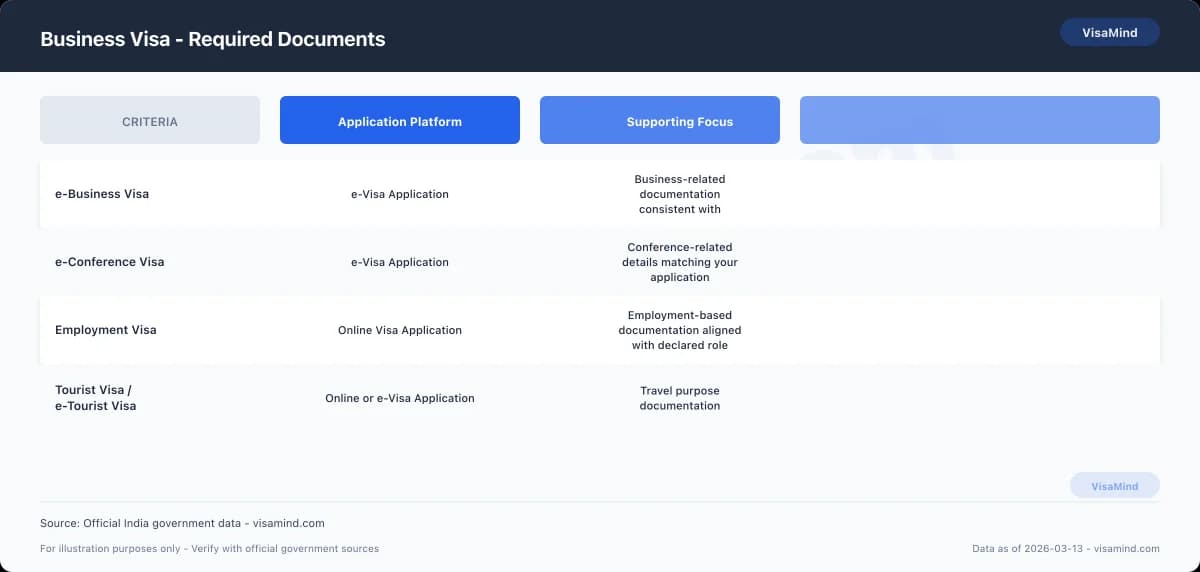
Required documents differ by visa category.
| Visa Type | Typical Supporting Document |
|---|---|
| e-Business Visa | Business card and company-related documents |
| e-Tourist Visa / Tourist Visa | Travel-related documents (not business proof) |
| e-Conference Visa | Conference-specific documentation |
| Employment Visa | Employment-related documentation |
Submit only documents that match your selected category. Applying under the wrong visa type can lead to refusal.
Download the current business visa instructions from the Bureau of Immigration before uploading documents. FRRO handles registration and extensions inside India if your stay requires it.
How to prepare files
Prepare digital files before starting the e-Visa Application. This helps avoid errors and incomplete submissions.
Steps:
-
Scan documents in color.
-
Make sure all text is readable and not cut off.
-
Match names and passport numbers exactly across all documents.
-
Upload the correct document under the correct label in the system.
Do not upload documents meant for another visa category unless the system specifically requests them.
Keep copies of everything you submit. If the FRRO or Bureau of Immigration requests clarification, you must provide the same documents without inconsistencies.
Fees and Processing Times
#Pay the required fees when you submit your Form Online Visa Application. The base application fee, the non‑refund policy, and the standard processing window of 5–10 business days for a Business category are the main points.
Application and biometric fees
The e‑Visa Application fee for an India Business Visa is ₹10 (as of February 2026). Pay this amount online when you complete the Online Visa Application.
| Fee Type | Amount (INR) | Notes |
|---|---|---|
| e‑Visa Application Fee | ₹10 | Non‑refundable, even if refused or canceled |
No additional emergency or express fee applies to granting an e‑Visa. This rule covers the e‑Business Visa and other e‑Visa categories such as the e‑Tourist Visa and e‑Conference Visa.
If you apply through a third-party center such as BLS or VFS, confirm any service charges directly with that center. These centers accept and forward applications but do not decide your case.
Refunds and special fees
The e‑Visa fee is non‑refundable. You will not receive a refund if:
- Your Business Visa application is refused
- You withdraw the application after submission
- You make an error in your application
This applies even if you never travel to India. Review all details carefully before you submit payment.
Authorities do not charge extra for urgent or expedited processing of an e‑Visa. If someone offers faster approval for an additional government fee, verify that claim through the official visa portal.
If you later extend your stay or complete registration inside India, the Foreigners Regional Registration Office (FRRO) handles those processes. Check directly with FRRO for any separate in‑country service fees.
Typical processing windows
Under the Standard processing track, a Business category application usually takes 5 to 10 business days (as of March 2026).
| Processing Type | Timeframe |
|---|---|
| Standard (Business) | 5–10 business days |
Processing times vary by visa category and where you apply.
You should:
-
Apply well in advance of your planned travel.
-
Monitor your application status through the official portal.
-
Confirm current timelines with the issuing authority before finalizing travel plans.
Do not book non‑refundable travel until you receive your visa approval.
Know When to Get Help
#Many India business visa applications can be completed independently if your situation is simple and your documents are clear. More complex cases, status changes, or in‑country registration issues often require professional guidance.
When self-preparation is usually fine
You can usually handle the process yourself if your travel purpose clearly fits the e-Business Visa category and your documents match that purpose.
Self-preparation works best when:
- You apply through the Form Online Visa Application or Form e-Visa Application system.
- Passport details, travel dates, and host company information are consistent.
- You do not plan to change to an Employment Visa, e-Conference Visa, e-Tourist Visa, or Tourist Visa after arrival.
- You have no prior visa refusals or overstays.
In straightforward cases, you complete the online form, upload required documents, and track your status through the same portal.
If you remain within your approved visa conditions and duration, you typically do not need to interact with the Foreigners Regional Registration Office (FRRO) beyond standard compliance requirements.
| Situation | Likely Approach |
|---|---|
| Short-term business meetings | Self-preparation |
| Clear invitation from Indian company | Self-preparation |
| No prior immigration issues | Self-preparation |
| No change of visa category planned | Self-preparation |
Situations that benefit from expert help
Professional guidance is recommended if your case involves status changes, compliance concerns, or in-country procedures.
Seek help if:
- You need to switch from an e-Business Visa to an Employment Visa.
- You entered on a Tourist Visa or e-Tourist Visa but now have business or paid work activities.
- You must register with or apply for an extension through the FRRO.
- You received a prior refusal or overstayed in India.
FRRO manages registration and visa extensions inside India. Errors in these applications can delay approvals or affect your legal stay.
If your activities resemble employment rather than business meetings, confirm the correct visa category before proceeding. Misclassification can create compliance problems at entry or during FRRO review.
| Scenario | Risk Level | Why Help Matters |
|---|---|---|
| Visa category change | High | Requires correct legal basis |
| Overstay history | High | Affects future approvals |
| FRRO extension request | Moderate to High | Requires precise documentation |
| Conference participation vs. business | Moderate | May require e-Conference Visa |
Where the official form applies
You must use the official application form when filing with the Bureau of Immigration (BOI) for entry and exit matters.
The BOI oversees arrival and departure controls. The FRRO handles registration and extensions within India.
Submit your Online Visa Application or e-Visa Application through the designated government system. Application centers such as BLS or VFS may collect submissions, but they do not make decisions.
Use the official form when:
- Applying for an e-Business Visa before travel.
- Requesting registration or extension through the FRRO.
- Updating visa details during your lawful stay in India.
| Authority | Role |
|---|---|
| Bureau of Immigration (BOI) | Entry and exit control |
| Foreigners Regional Registration Office (FRRO) | Registration and extensions inside India |
| BLS/VFS centers | Application submission support only |
Always complete the form that matches your visa category. Using the wrong category—such as applying under e-Tourist Visa instead of e-Business Visa—can lead to refusal or compliance issues at entry.
Who Can Apply
#
Apply for an India business visa if your purpose of travel fits within an approved business-related category and you meet the conditions attached to that category. Your eligibility depends on the exact activity you plan to carry out in India and the visa type you select through the Form Online Visa Application or Form e-Visa Application system.
Choosing the correct visa category at the start helps prevent delays, refusals, or problems with the Foreigners Regional Registration Office (FRRO) after arrival.
Eligible categories
You may qualify for an e-Business Visa or a regular Business Visa if your trip is for permitted business activities, not tourism or employment.
Don’t apply for:
- An e-Tourist Visa or Tourist Visa if business is your main purpose.
- An Employment Visa unless you’re actually taking up employment in India.
- An e-Conference Visa unless you’re attending a qualifying conference.
Eligibility depends on the purpose you declare in your application.
Immigration authorities look at whether your stated activity matches the visa category you’ve picked.
Here’s a table comparing common visa types business travelers often reference:
| Visa Type | Primary Purpose | Suitable for Business? |
|---|---|---|
| e-Business Visa | Business-related activities | Yes |
| Tourist Visa | Tourism and personal travel | No |
| Employment Visa | Long-term employment | No (unless employed) |
| e-Conference Visa | Conference attendance | Limited to conferences |
Your activities need to fit the visa you request.
Conference and meeting attendees
If you’re attending meetings, seminars, or formal conferences, figure out whether your visit fits under an e-Business Visa or an e-Conference Visa.
Not every event qualifies as business travel. Some structured conferences require an e-Conference Visa, while general business meetings may fall under a business category.
Before submitting your e-Visa Application, check:
- The exact nature of the event
- Whether it’s classified as a conference
- If special clearance applies
- Whether you need to register with the FRRO after arrival
The visa you select must match the activity you state in your application.
A mismatch can lead to entry issues with the Bureau of Immigration (BOI) at the port of entry or compliance issues with the FRRO once you’re in India.
Checking your category before applying
Review the official instructions for your eligibility category before starting your Online Visa Application.
Here’s a basic process:
-
Identify your exact purpose of travel.
-
Match it to the correct visa category.
-
Confirm you’re not engaging in tourism or employment activities.
-
Review post-arrival requirements with the FRRO.
Don’t rely on assumptions or informal advice.
The visa category defines what you can legally do in India.
If you’re unsure whether your activities fit under an e-Business Visa, e-Conference Visa, or another category, consult Government of India visa guidance before you apply.
Conditions of Stay
#Your India Business Visa allows certain commercial activities. It doesn’t permit regular employment in India.
Stick to the scope of your approved visa, comply with Foreigners Regional Registration Office (FRRO) rules, and don’t engage in activities that require an Employment Visa.
Allowed business activities
You can enter India to carry out legitimate business tasks that don’t involve salaried work for an Indian entity.
Permitted activities generally include:
- Attending business meetings, negotiations, and contract discussions
- Exploring business opportunities and market conditions
- Participating in trade fairs and exhibitions
- Establishing business contacts or setting up a venture
- Attending board meetings or internal company discussions
- Conducting pre‑sales or post‑sales activities that don’t amount to employment
If you applied through the e-Business Visa route using the Form Online Visa Application or Form e-Visa Application system, the same limits apply.
The Bureau of Immigration (BOI) decides entry at the airport, while FRRO handles registration or extensions inside India if needed.
Choose the correct visa category for your purpose.
An e-Conference Visa covers formal conferences.
An e-Tourist Visa or Tourist Visa doesn’t allow business negotiations or commercial representation.
| Visa Type | Business Meetings | Employment in India | Conference Attendance |
|---|---|---|---|
| Business Visa / e-Business Visa | Yes | No | Limited to business context |
| e-Conference Visa | Limited | No | Yes |
| Tourist Visa / e-Tourist Visa | No | No | No (unless specifically permitted) |
| Employment Visa | Yes | Yes | Yes |
Prohibited activities (employment)
You can’t take up employment in India on a Business Visa.
Employment includes:
- Getting a salary from an Indian company
- Doing full-time or part-time work for pay in India
- Providing hands-on services under a labor contract
- Filling an operational role in an Indian branch or subsidiary
If your role involves project execution, daily operations, or working under an Indian employment contract, you need an Employment Visa.
Authorities look at what you’re actually doing, not just your job title.
If your actions look like regular employment, you risk visa cancellation, denial of entry by BOI, or compliance action by FRRO.
Short-term limits and context
A Business Visa supports short-term commercial presence, not long-term residence.
Respect the validity period and number of entries on your visa approval.
If registration is required based on your stay, complete it with the FRRO within the prescribed timeframe.
Don’t switch to business activity while holding a Tourist Visa or e-Tourist Visa.
Apply under the right category through the Online Visa Application or e-Visa Application system before travel.
If your business plans turn into operational employment or long-term project execution, apply for an Employment Visa instead of exceeding your Business Visa limits.
Submitting Your Application
#Complete every required field, sign the form, and include supporting evidence before submission.
The process varies slightly depending on whether you’re applying for an e-Business Visa or another visa type, such as an Employment Visa, e-Conference Visa, Tourist Visa, or e-Tourist Visa.
Complete the form
Use the Form Online Visa Application or Form e-Visa Application platform for your visa type.
Select e-Business Visa if you’re applying electronically for short-term business activities.
Enter your personal details exactly as shown in your passport.
Don’t abbreviate names or change the order of given names and surnames.
Provide full information about:
- Your employer or business entity
- The Indian company or organization you’ll visit
- Your purpose of travel
- Intended duration of stay
If you’ve previously held an Indian visa, disclose it accurately.
This includes prior Tourist Visa, e-Tourist Visa, Employment Visa, or e-Conference Visa approvals.
Review all entries before submitting.
Mistakes or omissions can delay processing or cause refusal.
| Application Type | Platform Used | Typical Purpose |
|---|---|---|
| e-Business Visa | e-Visa Application | Short-term business activities |
| Employment Visa | Online Visa Application | Long-term employment in India |
| e-Conference Visa | e-Visa Application | Attending approved conferences |
| Tourist / e-Tourist Visa | Online or e-Visa platform | Tourism and non-business visits |
Sign and attach evidence
Sign the completed form where required.
Unsigned applications aren’t accepted.
Attach all required supporting documents.
Provide clear, legible copies in the format specified by the application system.
Common evidence includes:
- Passport bio page
- Business invitation or supporting letter
- Proof of your professional role or employment
Upload documents directly through the e-Visa Application portal when applying for an e-Business Visa.
For non-electronic categories, follow the submission instructions in your Online Visa Application account.
If applying from outside India, a visa facilitation center such as BLS or VFS may collect your documents.
These centers accept submissions but don’t decide your case.
Final submission steps
Check that all mandatory fields are complete in the system before you submit.
Incomplete sections can prevent processing.
After submission, follow the instructions in your application account.
You may need to:
-
Print the completed application form.
-
Submit biometrics if instructed.
-
Attend an appointment if required for your visa category.
Once you arrive in India, the Foreigners Regional Registration Office (FRRO) handles registration and visa extensions if applicable.
The Bureau of Immigration (BOI) manages entry and exit at the port of arrival.
Keep copies of your submitted form and all uploaded documents for your records.
Avoid These Errors
#Mistakes on your India business visa application can cause delays and refusals.
Focus on accuracy, consistency, and a careful review before you submit your Form Online Visa Application or Form e-Visa Application.
Expert tips before submission
Complete every field in the Online Visa Application exactly as it appears on your passport and supporting documents.
Even small spelling differences in your name, passport number, or date of birth can lead to rejection.
Review your entire e-Business Visa form before submitting.
Don’t rely on memory.
Check each entry against your passport and any uploaded documents.
Use this checklist before submission:
- Match your passport details exactly (name order, spacing, numbers).
- Confirm all required sections are filled in.
- Re-read every answer for typing errors.
- Make sure your selected visa type (e-Business Visa, e-Tourist Visa, e-Conference Visa, Tourist Visa, or Employment Visa) matches your stated purpose.
If you plan to register with the Foreigners Regional Registration Office (FRRO) after arrival, ensure your application information aligns with what you’ll present in India.
Common rejection causes
Most refusals come from incomplete or inconsistent information.
Authorities compare entries within the same application, not just against your passport.
Typical issues include:
- Leaving mandatory fields blank.
- Entering different spellings of your name in separate sections.
- Mismatched passport numbers or issue dates.
- Selecting e-Tourist Visa while describing business activities.
- Providing details that conflict with your chosen category, such as e-Business Visa vs. Employment Visa.
Here’s a table showing how errors lead to rejection:
| Error Type | Why It Causes Problems | How to Prevent It |
|---|---|---|
| Incomplete sections | Application appears unfinished | Fill in every required field before submission |
| Inconsistent personal details | Identity cannot be reliably verified | Copy details directly from passport |
| Wrong visa category selection | Purpose does not match visa conditions | Confirm correct visa type before applying |
Minor differences aren’t ignored.
The reviewing authority assesses the application as submitted.
How to check for consistency
Treat your review as a line-by-line audit.
Open your passport and compare each data point with what you entered in the e-Visa Application.
Follow this process:
-
Verify your full name, passport number, and dates first.
-
Check that your stated purpose matches your selected visa type.
-
Re-read all narrative or descriptive answers for clarity and alignment.
-
Make sure no section is left incomplete.
If you’ve previously applied for another category, such as a Tourist Visa or e-Conference Visa, don’t accidentally reuse outdated information that conflicts with your current e-Business Visa purpose.
Consistency across the form reduces the risk of refusal and prevents unnecessary follow-up with the FRRO after arrival.
Fees
#| Component | Amount |
|---|---|
| Application feeExtracted from guide content — verify against official source | $10 |
Fees change; always verify on FRRO.