
India e-Conference Visa — What the e-Conference Visa Covers
#The India e-Conference Visa lets you enter India to attend specific government-linked events. It grants a 30-day, single-entry stay strictly for conference-related participation.
Purpose and scope
The e-Conference Visa permits travel to India to attend a conference, seminar, or workshop organized by:
- A Government of India body
- A State Government entity
- A Public Sector Undertaking (PSU)
You may use this visa only for participation in the approved event. It does not authorize tourism, employment, business negotiations, or medical treatment.
Key parameters:
| Feature | Details |
|---|---|
| Validity | 30 days |
| Entries | Single entry |
| Allowed activity | Attend approved conference/seminar/workshop |
| Organizers | Government bodies or PSUs only |
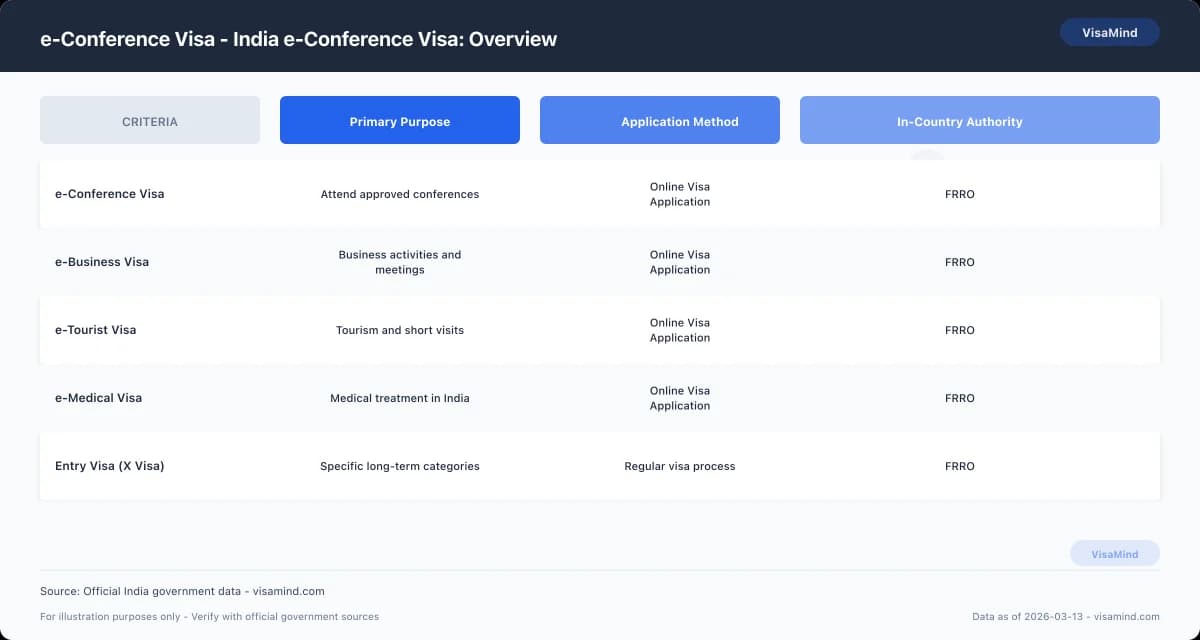
If your purpose differs, you must apply under the correct category, such as the e-Business Visa, Business Visa, e-Tourist Visa, e-Medical Visa, or Entry Visa (X Visa).
You apply through the Form Online Visa Application system under the Form e-Visa Application process.
Who attends
You qualify if you plan to attend an event that meets all of the following:
- Organized by a Government authority or PSU in India
- Structured as a conference, seminar, or workshop
- Requires your physical presence in India
This visa covers delegates, speakers, panel participants, and registered attendees.
It does not cover private corporate conferences that lack government or PSU organization. In those cases, you may need an e-Business Visa or standard Business Visa instead.
After arrival, you must comply with Indian immigration rules. The Bureau of Immigration (BOI) manages entry and exit at ports.
If registration or visa-related issues arise during your stay, the Foreigners Regional Registration Office (FRRO) handles in-country matters.
Context and typical events
You use the e-Conference Visa when a government ministry, department, or PSU hosts a formal event that invites international participants.
Typical examples include:
- Policy conferences
- Sector-specific government seminars
- Public sector technical workshops
- Official symposiums
Your stay cannot exceed 30 days, and you cannot re-enter on the same visa once you depart.
If you need to attend another event later, you must submit a new e-Visa Application.
If your activities expand beyond conference participation—such as commercial negotiations or long-term collaboration—you must apply under the appropriate visa category before travel.
How to Apply Step by Step — India conference visa
#Start with the official form and follow the instructions for your eligibility category.
Complete every required field, sign the application, and submit it with the specified supporting evidence through the proper channel.
Get the current form and instructions
Download the current e-Conference Visa application and instructions from the official Bureau of Immigration (BOI) website.
Review the instructions before you begin. Confirm that you qualify under the conference category and that you are not better suited to another visa type, such as the e-Business Visa, Business Visa, e-Tourist Visa, e-Medical Visa, or Entry Visa (X Visa).
Use the correct platform for your case:
| Application Type | Where You Apply | Who Decides |
|---|---|---|
| Form e-Visa Application (including e-Conference) | Form Online Visa Application system | Government of India authorities |
| Regular paper visa | Authorized submission center | Government of India authorities |
BOI manages entry and exit. The Foreigners Regional Registration Office (FRRO) handles registration and extensions inside India.
Complete, sign and attach evidence
Fill out all required sections of the Online Visa Application accurately. Enter your personal details exactly as shown in your passport.
Answer every question fully. Do not leave mandatory fields blank.
Before submission, review your form line by line. Errors in names, passport numbers, or eligibility category can delay a decision.
Prepare the required supporting evidence listed in the official instructions. Attach only the documents specified for the e-Conference Visa category.
Use this checklist:
- Completed e-Visa Application form
- Signature where required
- Supporting evidence listed in the official instructions
- Any category-specific documents noted for your eligibility group
If you apply under a different visa type, follow that category’s document list instead. Each visa classification has its own requirements.
Submit and await decision
Submit your completed application and supporting evidence through the designated Online Visa Application system or authorized submission channel, as instructed for your case.
After submission, monitor your application status through the same system. Do not make travel plans that depend on approval until you receive a decision.
If you later need to register or extend your stay in India, contact the FRRO, which handles post-entry immigration matters.
BOI oversees entry and exit at the border but does not process extensions inside India.
What It Costs and How Long
#You pay a fixed government fee and receive a decision within a standard window. Processing times can shift based on category and where authorities review your file.
Application fee
You must pay the e-Conference visa fee through the Form Online Visa Application / Form e-Visa Application portal before submission.
The fee is set by the Government of India and listed in INR (₹) on the official portal at the time you apply.
The amount can change, so confirm the current INR figure on the government site before you pay.
- Payment is mandatory to submit your application.
- Fees for other categories—such as the e-Business Visa, e-Tourist Visa, e-Medical Visa, Business Visa, or Entry Visa (X Visa)—are separate and may differ.
- Application centers such as BLS or VFS may collect service charges, but they do not decide your case.
| Item | Details |
|---|---|
| Visa type | India e-Conference Visa |
| Government fee | Listed in INR (₹) on official e-Visa portal |
| Payment stage | During online submission |
| Decision authority | Government of India (not BLS/VFS) |
If you later extend or register your stay inside India, the Foreigners Regional Registration Office (FRRO) handles that process and may charge additional fees.
Standard processing window
Under standard processing, you can expect a decision in 3 to 5 business days. This timeframe applies to properly completed e-Conference visa applications submitted online.
Business days exclude weekends and government holidays. Delays occur if you submit incomplete information or unclear documents.
Plan your travel with this window in mind:
-
Submit your Online Visa Application well in advance.
-
Wait for approval before boarding your flight.
-
Carry a copy of your approval when you travel.
The Bureau of Immigration (BOI) manages entry and exit at Indian airports, but it does not control pre‑arrival processing times.
Variable times by category/location
The processing times can vary depending on your visa category and the location reviewing your application.
While the e-Conference visa typically falls within the 3–5 business day window, other categories may follow different timelines.
For example:
- e-Business Visa and e-Medical Visa applications may be assessed separately.
- Regular Business Visa or Entry Visa (X Visa) applications submitted outside the e-Visa system can take longer.
- Local workload and verification requirements affect timing.
If you apply from a region with higher application volume, review times may extend beyond the standard range.
Always verify current processing estimates through the official Government of India visa portal before finalizing travel plans.
Avoid These Errors
#
Most rejections stem from preventable form errors. Accuracy and consistency across your entire Form Online Visa Application determine whether your India e-Conference Visa moves forward or stops.
Expert tips before submitting
Complete every field in the Form e-Visa Application exactly as your passport and supporting documents show.
Even small differences in spelling, numbering, or dates can create inconsistencies.
Use your passport as the primary reference.
Match:
- Your full name (including middle names, if shown)
- Passport number
- Date and place of birth
- Issue and expiry dates
Review the entire form before final submission. Do not rely on memory.
If you previously applied for an e-Tourist Visa, e-Business Visa, e-Medical Visa, Business Visa, or Entry Visa (X Visa), ensure your details remain consistent with past records.
Differences between applications may trigger scrutiny.
Take time to re-check each section. The system does not correct factual errors for you, and FRRO reviews depend on what you submit.
Common mistakes that cause rejection
Applications fail most often due to incomplete or inconsistent information. This includes missing fields, partial answers, or mismatched data across sections.
Typical problem areas include:
- Passport details entered differently in separate sections
- Names spelled one way in personal details and another in document fields
- Dates that do not match the passport exactly
| Error Type | What Happens | Why It Leads to Rejection |
|---|---|---|
| Incomplete sections | Application appears unfinished | Authorities cannot verify identity |
| Mismatched passport details | Data conflict within the form | Raises reliability concerns |
| Inconsistent personal information | Differences across answers | Prevents clear identification |
FRRO and reviewing authorities assess what you submit. They do not assume corrections.
How to avoid errors
Follow a structured review process before you click submit.
-
Enter all information directly from your passport.
-
Complete every section of the Online Visa Application.
-
Review the entire form from start to finish.
-
Compare each entry against your passport again.
Do not rush the final step.
Keep your passport open while reviewing. Confirm every number and date digit by digit.
This applies whether you apply for an India e-Conference Visa, e-Business Visa, or any other e-Visa category.
Accuracy protects your application. Consistency across all sections prevents avoidable rejection.
Who Can Apply
#You can apply for an India e-Conference Visa if you meet specific passport standards and complete the required Form Online Visa Application accurately.
Your eligibility depends first on your travel document and your ability to satisfy the basic application conditions.
Passport requirements
Your passport must meet strict validity and page requirements at the time you apply and when you arrive in India.
You must have:
- A passport valid for at least six months from the date of arrival in India
- At least two blank pages available for immigration stamping
- A passport in good physical condition, with no damage to the identity page
Indian Immigration Officers place entry and exit stamps in your passport.
If you do not have two blank pages, you may be denied boarding or entry.
Use this checklist before submitting your Form e-Visa Application:
| Requirement | What You Need | Why It Matters |
|---|---|---|
| Passport validity | Minimum 6 months remaining | Required for entry approval |
| Blank pages | At least 2 | Needed for immigration stamps |
| Physical condition | Undamaged identity page | Must be machine-readable |
If your passport does not meet these standards, renew it before you begin the Online Visa Application.
Eligibility checklist
You qualify to apply only if you can complete the e-Visa Application using a passport that satisfies India’s entry rules.
Before applying, confirm that:
- Your passport meets the six-month validity rule
- Your passport has two blank pages
- You can submit your application through the official Online Visa Application system
- You are applying specifically for an e-Conference Visa, not an e-Tourist Visa, e-Business Visa, e-Medical Visa, Business Visa, or Entry Visa (X Visa)
Each visa category has different requirements and purposes. Applying under the wrong category can delay processing or lead to refusal.
If you need registration or visa extension services after arrival, the Foreigners Regional Registration Office (FRRO) handles those matters inside India.
Entry and exit control remain under immigration authorities at the port of entry.
Review eligibility before starting
Do not begin the e-Visa Application until you confirm your passport fully complies with the validity and blank page requirements.
Check the expiration date carefully. Count blank pages physically; endorsement pages do not substitute for visa pages.
If you are unsure whether your situation fits an e-Conference Visa or another category such as the e-Business Visa or Entry Visa (X Visa), review the official Government of India visa guidance before proceeding.
Submitting an incorrect or incomplete Online Visa Application can delay your travel plans. Verify your documents first, then apply.
Document Checklist
#You’ll need to upload clear digital copies of specific documents with your Form e-Visa Application. The system won’t process your Form Online Visa Application without these files.
Get each document ready ahead of time. Double-check that all the information lines up with your passport and conference details.
Scanned passport bio page
Submit a scanned copy of your passport’s biographical page. This is the page with your full name, date of birth, passport number, photograph, and nationality.
The scan must be clear and fully legible. No glare, shadows, or cropped edges—every detail should be easy to read.
Your passport details must match what you enter in the e-Visa Application. Even small errors can cause delays or rejection.
Use a clean, color scan if possible. Avoid blurry images or photos taken at odd angles.
| Requirement | What to Check Before Uploading |
|---|---|
| Identity details | Name and passport number match your application exactly |
| Image clarity | No glare, blur, or cut-off edges |
| Complete page | Entire bio page visible, including machine-readable zone |
| File accuracy | Correct document uploaded under the passport section |
If you later extend your stay or register in India, the Foreigners Regional Registration Office (FRRO) will refer to this same passport information.
Invitation from the conference organizer
You must upload an invitation from the conference organizer in India. This confirms your reason for travel under the India e-Conference visa category.
The invitation should show:
- Your full name
- The name of the conference
- The organizing body in India
- The nature of your participation
The details in your invitation need to match your Online Visa Application.
Don’t submit documents for other visa types. The purpose in your documents must match conference participation.
| Element | Must Be Clearly Shown |
|---|---|
| Applicant identity | Your full legal name |
| Event details | Official conference name |
| Host information | Name of organizing entity in India |
| Purpose | Participation in the conference |
Vague or inconsistent invitations can slow things down.
Other supporting evidence to submit
Review your e-Visa Application and make sure all uploaded documents support your stated purpose of travel.
Only submit documents directly related to conference attendance. Avoid adding materials meant for other visa categories.
If authorities need clarification after you arrive, FRRO handles registration and extensions in India. Entry and exit are managed by the Bureau of Immigration (BOI). Visa facilitation centers collect documents but don’t make approval decisions.
Keep digital copies of everything you submit. You might need to present them during travel or registration.
When to Consult a Professional
#Professional guidance may be necessary if your e-Conference Visa involves government clearances or coordination with several Indian authorities. The most sensitive issue is securing political clearance from the Ministry of External Affairs for an e-Conference Visa.
When expert help is recommended
Consult a professional if your conference participation depends on political clearance from the Ministry of External Affairs. Missing this requirement can delay or affect your Form Online Visa Application.
Seek assistance if:
- Your conference involves government bodies or official delegations
- The event needs prior approval from Indian authorities
- You’re unsure if your event qualifies under the e-Conference Visa
- Your application was delayed or flagged during the Form e-Visa Application process
Advice is also helpful if you’re deciding between an e-Conference Visa, e-Business Visa, Business Visa, e-Tourist Visa, e-Medical Visa, or Entry Visa (X Visa). Choosing the wrong category can lead to refusal or complications with FRRO after arrival.
Which authorities and clearances matter
Your application might involve several authorities, each with a specific role.
| Authority | Role in the e-Conference Visa process |
|---|---|
| Ministry of External Affairs (India) | Grants required political clearance for e-Conference Visa cases |
| Foreigners Regional Registration Office (FRRO) | Handles registration and visa-related matters inside India |
| Bureau of Immigration (BOI) | Manages entry and exit at Indian borders |
| BLS/VFS centers | Accept and forward applications; do not make decisions |
If political clearance is required and not secured, your visa will not proceed. You can’t substitute this with documents meant for other visa types.
Your Online Visa Application must reflect your travel purpose and match your conference documentation exactly.
How a professional can assist
A qualified professional checks whether your event needs political clearance before you submit the e-Visa Application. This helps avoid delays.
They can:
-
Confirm if your case fits the e-Conference Visa category
-
Identify if political clearance from the Ministry of External Affairs is needed
-
Ensure your supporting documents match your stated purpose
-
Advise if another visa category, like Business Visa or Entry Visa (X Visa), is better for your situation
If you’re already in India and dealing with FRRO, a professional can guide you on compliance and communication.
What You Can and Cannot Do
#The India e-Conference Visa is limited to specific activities tied to your conference. You’re bound by rules on stay length, entry type, and permitted conduct.
Length of stay and entries
The e-Conference Visa allows up to 30 days in India from your arrival date. The 30-day period starts when you enter the country.
This visa permits a single entry only. If you leave India, you can’t re-enter on the same visa, even if you have days left.
| Feature | India e-Conference Visa |
|---|---|
| Maximum stay | 30 days from arrival |
| Number of entries | Single entry |
| Stay calculation | From date of arrival |
Plan your travel accordingly. If your schedule changes and you need to exit and re-enter India, you’ll need a new visa through the Form Online Visa Application system.
If you need multiple entries or a longer stay, look into other visa categories like e-Business Visa, Business Visa, e-Tourist Visa, e-Medical Visa, or Entry Visa (X Visa).
Activity restrictions
You may attend only the conference specified in your visa approval. Your activities must match your declared purpose in the Form e-Visa Application.
You cannot:
- Take up employment in India
- Engage in long-term business operations
- Enroll in academic study programs
- Conduct activities unrelated to the approved conference
If your visit involves broader commercial engagement, the e-Business Visa or Business Visa may be more suitable. For medical treatment, apply for an e-Medical Visa.
The Bureau of Immigration (BOI) checks your entry and exit. If your activities don’t match your visa type, you risk denial of entry or future visa issues.
Extension and overstay notes
The e-Conference Visa is issued for a short, fixed duration. Extensions aren’t generally available.
If you need to extend your stay, contact the Foreigners Regional Registration Office (FRRO) inside India. FRRO handles visa extensions and registration.
Don’t overstay your 30-day limit. Overstaying can result in fines, exit delays, and restrictions on future Indian visa approvals.
If your conference may run longer than 30 days, apply for a more suitable visa category before traveling.
How Your Application Is Assessed
#Indian authorities review each Form e-Visa Application individually. Approval isn’t automatic, and submitting an Form Online Visa Application doesn’t guarantee you’ll get the visa.
A reviewing officer checks your documents, purpose of travel, and consistency before making a decision.
Decision is at the officer's discretion
A visa officer reviews your application based on what you submit. There’s no right to approval just because you meet eligibility or received an invitation.
The officer checks if your stated purpose fits the e-Conference Visa category. If your activities look more like those under an e-Business Visa, Business Visa, e-Tourist Visa, e-Medical Visa, or Entry Visa (X Visa), the officer may decide you applied under the wrong category.
You need to make sure:
- Your conference invitation clearly identifies you
- Your passport details match your application
- Your visit is limited to conference-related activities
Applications submitted through BLS or VFS centers are forwarded, but those centers don’t make decisions. The final determination rests with the relevant Indian authority.
If you later require registration or an extension in India, FRRO handles those matters. Entry and exit control is managed by BOI.
Common application red flags
Officers look for inconsistencies or missing information. Even small discrepancies can cause problems.
Common red flags:
- Mismatched passport numbers or spelling errors
- Incomplete sections in the Online Visa Application
- Vague or unclear description of conference activities
- Documents that don’t support your stated purpose
If your plans resemble commercial negotiations or contract discussions, the officer may question whether you should have applied for an e-Business Visa.
| Stated Activity | Appropriate Category | Risk if Mismatched |
|---|---|---|
| Attending a conference | e-Conference Visa | Refusal or delay |
| Business negotiations | e-Business Visa | Incorrect category finding |
| Tourism activities only | e-Tourist Visa | Purpose inconsistency |
You need a clear, consistent narrative across your application.
Why some applications are refused
Refusals happen when the officer isn’t convinced you qualify under the e-Conference category. This usually comes down to credibility, missing documentation, or category mismatch.
If your documents don’t support your stated purpose, the officer may find your application lacks sufficient basis. Filing the application doesn’t guarantee a visa.
Other reasons for refusal:
- Applying under the wrong visa type
- Submitting unclear or contradictory information
- Not demonstrating a genuine conference purpose
Reducing risk means ensuring your application is accurate, consistent, and focused on conference attendance only.
Fees
#| Component | Amount |
|---|---|
| Application feeApplication fee: $80 (as of 2026-02). Verify the current fee on the official schedule before filing. | $80 |
Fees change; always verify on FRRO.