India tourist visa: Overview
#
India issues tourist visas for travel, leisure, and short-term study that doesn't lead to formal qualifications. You can apply through an embassy or complete an Form Online Visa Application / Form e-Visa Application if you qualify for an e-Tourist Visa.
For anything outside tourism—business, medical treatment, or conferences—you need the correct category (e-Business Visa, e-Medical Visa, e-Medical Attendant Visa, or e-Conference Visa).
India tourist visa: permitted purposes
Use an India tourist visa for tourism and visiting friends or relatives.
Permitted purposes include:
- Sightseeing and travel within India
- Informal visits with friends or family
- Leisure travel not tied to employment or business
A tourist visa doesn't allow you to conduct business, receive medical treatment, or attend official conferences. Those require separate visa types.
| Activity | Tourist Visa Allowed | Correct Alternative (if not allowed) |
|---|---|---|
| Tourism and sightseeing | Yes | — |
| Visiting friends/relatives | Yes | — |
| Business meetings | No | e‑Business Visa |
| Medical treatment | No | e‑Medical Visa |
| Assisting a medical patient | No | e‑Medical Attendant Visa |
| Conference attendance | No | e‑Conference Visa |
If you stay in India beyond your permitted time, the Foreigners Regional Registration Office (FRRO) handles registration and extension matters inside India. Entry and exit control is handled by the Bureau of Immigration (BOI).
Short courses & leisure activities allowed
The e-Tourist Visa lets you attend short-term recreational courses.
You can enroll in programs such as:
- Yoga courses
- Local language classes
- Music or dance instruction
- Arts and crafts workshops
- Cooking courses
These courses must not go beyond six months and must not result in a formal academic qualification.
| Course Type | Maximum Duration | Qualification Allowed |
|---|---|---|
| Yoga | Up to 6 months | No |
| Language | Up to 6 months | No |
| Music/Dance | Up to 6 months | No |
| Arts & Crafts | Up to 6 months | No |
| Cooking | Up to 6 months | No |
If your program leads to a recognized diploma, degree, or certificate tied to formal education, you need a different visa category. Check requirements in the official Government of India visa guidance before applying.
Visiting friends/family and multi-entry options
A tourist visa covers visits to friends or relatives anywhere in India.
Some nationalities can get multiple-entry tourist visas valid up to 10 years. The length of each stay depends on the visa issued.
| Feature | Details |
|---|---|
| Purpose | Visiting friends and family |
| Entry Type | Single or multiple entry (varies) |
| Maximum validity (select nationalities) | Up to 10 years |
If you expect repeated visits, request a multiple-entry visa when you apply. Apply through the embassy or complete the e-Visa Application if eligible.
For stays that require registration, contact the FRRO for registration and extensions within India.
Required Documents (India visitor visa)
#You must submit a valid passport and clear digital copies through the Form Online Visa Application system. Documents must meet specific validity and format standards before you complete your Form e-Visa Application.
Passport validity
Your passport must be valid for at least six months at the time you apply for an e-Tourist Visa, e-Business Visa, e-Medical Visa, e-Medical Attendant Visa, or e-Conference Visa.
If your passport doesn't meet this six-month requirement, your application won't be complete. Renew your passport before starting the Online Visa Application process.
Check these points:
- Passport validity of minimum six months on the date of application
- Passport must be the same document you use for travel
- Details must match exactly what you enter in your e-Visa Application
If you later extend or manage your stay inside India, the FRRO handles those matters. Your passport is your primary identity document throughout.
Scanned passport bio page
Upload a scanned copy of your passport’s biographical page. This page shows your photograph and personal details.
The scan must clearly show:
- Your full name
- Passport number
- Date of birth
- Nationality
- Photograph
- Passport issue and expiry dates
Make sure the image is sharp, complete, and not cropped or blurry. Incomplete scans can delay your e-Visa Application.
The information on this scanned page must match the details you enter in the Online Visa Application form. Any mismatch can affect your application.
| Document | What It Must Show | Key Requirement |
|---|---|---|
| Passport bio page scan | Photo and personal details | Clear, complete, readable copy |
| Passport (physical) | Valid travel document | At least 6 months validity at application |
Supporting evidence to submit
You must submit your passport documents together with the required supporting evidence for your selected visa category.
The exact evidence depends on whether you apply for an:
- e-Tourist Visa
- e-Business Visa
- e-Medical Visa
- e-Medical Attendant Visa
- e-Conference Visa
Upload all required evidence during the Online Visa Application process. Submit everything at once to avoid delays.
If you're unsure which supporting documents apply to your visa type, check the Government of India e-Visa guidance before submitting your application.
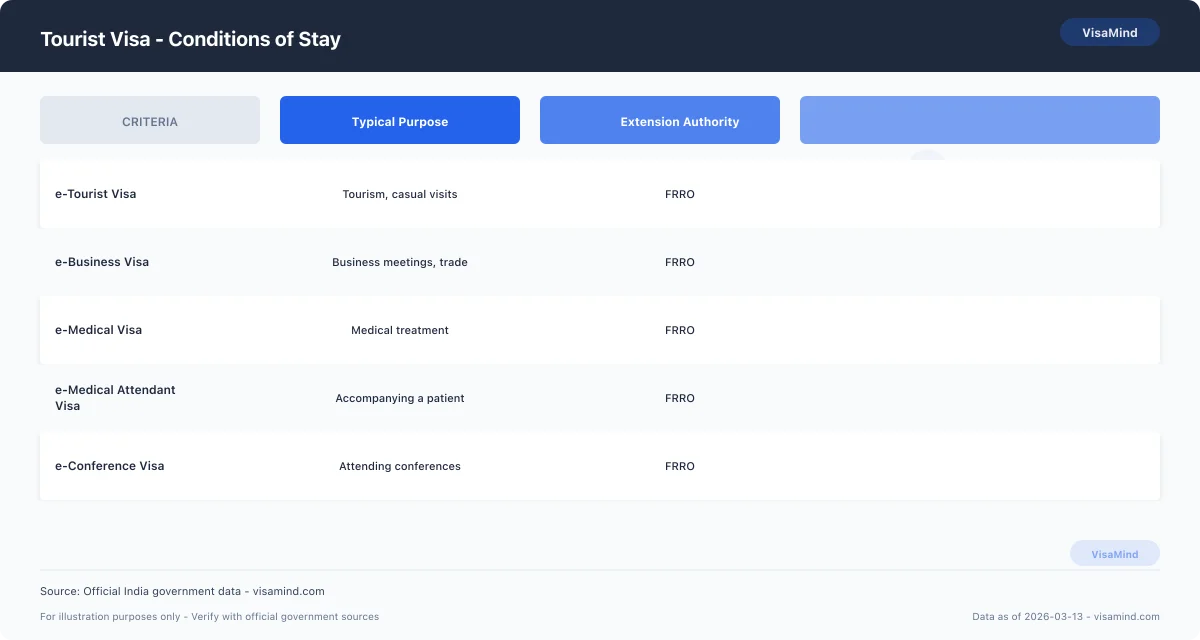
Conditions of Stay
#Your visa conditions dictate what you can do in India, entry formalities, and how long you can stay. You must follow the rules tied to your specific visa type and comply with immigration procedures at arrival and during your stay.
Work, study and volunteer rules
An e-Tourist Visa doesn't allow paid employment. You can't receive monetary compensation from an Indian source while in tourist status.
You may take part in short-term voluntary activities for up to one month under an e-Tourist Visa, as long as you receive no payment. Any salary, stipend, or financial benefit violates your status.
Other visa categories allow activities tied to their purpose. Match your activities to your visa type.
| Visa Type | Primary Purpose | Paid Work Allowed |
|---|---|---|
| e-Tourist Visa | Tourism and limited unpaid volunteering (up to 1 month) | No |
| e-Business Visa | Business-related activities | Check official government guidance |
| e-Medical Visa | Medical treatment | No employment |
| e-Medical Attendant Visa | Accompanying a medical patient | No employment |
| e-Conference Visa | Attending conferences | No employment |
If you plan to work, study, or engage in long-term volunteering, apply for the correct visa category through the Form Online Visa Application or Form e-Visa Application system before travel.
Arrival procedures and biometrics
With an e-Visa, immigration authorities collect your biometric information when you arrive in India. This happens at the immigration counter.
Present your valid passport and approved e-Visa to the Bureau of Immigration (BOI) officer at the port of entry. BOI manages entry and exit control.
Follow these steps at arrival:
-
Present your passport and visa approval.
-
Provide biometric data as required.
-
Receive entry clearance from the immigration officer.
Not following biometric collection or entry procedures can result in denied entry.
Duration limits and restrictions
Your permitted stay depends on the visa category issued to you. Don't remain in India beyond the validity granted on entry.
If you need to extend or manage your stay inside India, contact the FRRO. FRRO handles registration and visa extensions within India.
Key restrictions:
- Don't overstay your authorized period.
- Don't engage in activities outside your visa category.
- Don't convert unpaid volunteering into paid work.
For validity periods and extension eligibility, consult the official Government of India visa guidance before travel. Check your entry stamp after arrival.
What It Costs and How Long
#You pay a government visa fee and a mandatory welfare surcharge. Standard processing is measured in business days. The timeline depends on your visa category and where you apply.
Application and ICWF fees
You pay two separate charges with your Form Online Visa Application / Form e-Visa Application:
| Fee type | Amount (INR) | Notes |
|---|---|---|
| Tourist visa application fee | ₹8,300 | As of Feb 2026 |
| Indian Community Welfare Fund (ICWF) | ₹830 | Mandatory surcharge |
The ICWF supports Indian nationals abroad and applies to visa applicants. Verify both amounts on the Government of India portal before you pay.
These figures apply to a Tourist Visa, including the e-Tourist Visa. Fees for other categories—like the e-Business Visa, e-Medical Visa, e-Medical Attendant Visa, and e-Conference Visa—may differ. Check your specific category in the Online Visa Application system before submitting payment.
Visa application centers may collect service charges for handling your file, but they don't decide your case.
Processing time estimates
A tourist visa typically takes 5 to 10 business days to process as of March 2026.
| Category | Standard processing time |
|---|---|
| Tourist Visa (including e-Tourist Visa) | 5–10 business days |
The processing time starts after you properly submit your application and documents. Incomplete forms or missing uploads delay your case.
Timelines vary by visa type and processing location. An e-Business Visa, e-Medical Visa, e-Medical Attendant Visa, or e-Conference Visa may follow a different schedule.
If you apply from abroad, the issuing authority sets the timeline. If you're already in India and seek an extension or registration, the FRRO handles that request separately from your initial visa decision.
Variations and where to verify
Processing speed depends on:
- Your visa category (Tourist, e-Tourist, e-Business, e-Medical, e-Medical Attendant, e-Conference)
- Your application completeness
- The processing location
- Current application volume
Visa facilitation centers accept and forward applications, but don't approve or refuse visas. The decision rests with Indian authorities.
For current fees and timelines, verify details directly on indianvisaonline.gov.in before you apply. If you're inside India and dealing with registration or extension issues, confirm procedures with the FRRO.
Tips and Common Mistakes
#Small errors in your Form Online Visa Application can delay approval or lead to rejection. Accuracy and consistency matter at every step.
Expert tips before submission
Complete every field in the Online Visa Application exactly as your passport shows it. Name, passport number, and date of birth must match character for character.
Choose the correct visa type at the start. Options include:
- e-Tourist Visa
- e-Business Visa
- e-Medical Visa
- e-Medical Attendant Visa
- e-Conference Visa
Selecting the wrong category can invalidate your purpose of travel and cause problems at entry.
Understand which authority handles each stage of your stay:
| Authority | Role |
|---|---|
| FRRO (Foreigners Regional Registration Office) | Registration and visa extensions inside India |
| Bureau of Immigration (BOI) | Entry and exit at Indian airports and borders |
| BLS/VFS centers | Accept and forward applications; do not make decisions |
Before you submit, review every answer carefully. Double-check the final confirmation screen.
Common form errors to avoid
Don’t leave sections blank unless the form marks them as optional. Incomplete forms tend to cause delays.
Inconsistencies between your passport and the application can create issues during processing or at immigration control with the BOI. Even minor spelling differences matter.
Be careful not to mix up visa categories. For instance:
- Applying for an e-Tourist Visa when your purpose fits an e-Business Visa
- Selecting e-Medical Visa instead of e-Medical Attendant Visa
- Choosing e-Conference Visa without confirming your travel purpose matches that category
BLS and VFS won’t correct mistakes for you. They just forward your file; they don’t approve or edit it.
Double-check every uploaded detail before you hit submit. After you submit the Form e-Visa Application, corrections might require starting over.
How to review your application
Set aside time for a careful review. Avoid using a mobile device if it limits your view of the form.
Use this checklist:
-
Confirm your passport details match exactly.
-
Verify you chose the correct visa category.
-
Recheck all personal information for spelling and number accuracy.
-
Ensure all required sections are completed.
-
Read every declaration before confirming.
Compare your answers with your passport and your stated travel purpose. If you plan to seek registration or an extension later, the FRRO will rely on what you provide now.
Submit only when you’re sure every entry is accurate and complete.
How to Apply Step by Step
#You apply for an India Tourist Visa using the Government of India’s online system. Start on the official portal, review instructions for your visa category, and submit a complete, signed application with the necessary evidence.
Use the government online portal
Access the Form Online Visa Application system run by the Government of India. This portal covers applications for the e‑Tourist Visa, as well as e‑Business Visa, e‑Medical Visa, e‑Medical Attendant Visa, and e‑Conference Visa.
Pick the correct visa type before starting. Your eligibility category controls which form fields and evidence you’ll need.
| Visa Category | Apply Through Online Portal | Review Category Instructions First |
|---|---|---|
| e‑Tourist Visa | Yes | Yes |
| e‑Business Visa | Yes | Yes |
| e‑Medical Visa | Yes | Yes |
| e‑Medical Attendant Visa | Yes | Yes |
| e‑Conference Visa | Yes | Yes |
Fill out each section carefully. Enter your details exactly as shown in your passport.
If you need to extend or register your stay inside India, the Foreigners Regional Registration Office (FRRO) handles those matters. The Bureau of Immigration (BOI) oversees entry and exit procedures.
Download official instructions (Bureau of Immigration)
Use only the latest version.
Read the instructions for your specific eligibility category before starting the form. Don’t rely on old guidance.
Pay attention to:
- Eligibility requirements for your visa
- Required supporting documents
- Signature and submission rules
- Any category‑specific declarations
For entry or exit requirements, consult the Bureau of Immigration. For registration or visa matters inside India, consult the FRRO.
Follow the written instructions exactly. Incomplete or inconsistent information can slow things down.
Complete, sign and submit with evidence
Fill out all required sections of the e‑Visa Application. Don’t leave mandatory fields blank.
Before submitting, check:
- ✅ All required fields are filled
- ✅ Information matches your passport
- ✅ Correct visa category is selected
- ✅ Supporting evidence is ready
- ✅ Application is signed where needed
Sign the application where instructed. An unsigned form doesn’t meet requirements.
Submit the completed application through the online system. Include all required evidence at the time of submission, following the instructions for your visa category.
When to Consult a Professional
#A tourist visa application can be refused even if you provide all required details. Professional guidance is worth considering when your situation is complicated, involves discretion, or you have prior immigration issues.
When to seek expert help
Seek expert help if your Form Online Visa Application or Form e-Visa Application involves circumstances that aren’t straightforward.
For example, consult a professional if:
- You’ve had a visa refusal before.
- You’re unsure which visa category fits your travel purpose.
- You need to switch from an e-Tourist Visa to another visa type.
- You’re dealing with post‑arrival registration or extension issues.
Submitting an application doesn’t guarantee approval. A professional helps you present accurate information and avoid inconsistencies that could lead to delays or refusal.
Get advice before contacting the Foreigners Regional Registration Office (FRRO) about registration or extension. FRRO handles visa extensions and registration inside India, and mistakes at this stage can affect your legal stay.
Cases that often need professional support
Some visa categories require more documentation and scrutiny than a standard tourist visit.
Support is often needed if you’re applying for:
| Visa Type | Why Professional Review Helps |
|---|---|
| e-Business Visa | Business purpose must align with visa conditions |
| e-Medical Visa | Medical purpose must be clearly documented |
| e-Medical Attendant Visa | Must connect properly to the primary medical applicant |
| e-Conference Visa | Requires clear event-related justification |
If your travel purpose overlaps categories, get advice before submitting your Online Visa Application.
Consult a professional if your case involves coordination between authorities.
- FRRO manages extensions and registration inside India.
- BLS/VFS centers accept applications but don’t decide outcomes.
- BOI (Bureau of Immigration) controls entry and exit at the border.
Knowing who makes decisions keeps you from sending requests to the wrong office.
Who handles complex or discretionary issues
Cases involving complexity or discretion need structured legal analysis.
Work with an experienced immigration professional if your case involves:
- Prior visa refusal or cancellation
- Compliance questions from a previous stay
- Uncertainty about what’s allowed under your visa type
- The need to request clarification from FRRO
Professionals don’t control approvals, but they help you prepare accurate submissions and explanations.
They’ll make sure your application matches the correct visa category, whether e-Tourist Visa, e-Business Visa, e-Medical Visa, e-Medical Attendant Visa, or e-Conference Visa.
When your situation involves discretion or prior complications, careful preparation reduces mistakes and strengthens your case before the relevant authority.
Who Can Apply
#You can apply for an India tourist visa if your trip fits certain permitted purposes and you meet nationality requirements. Eligibility also depends on whether you apply online for an e-Visa or through an embassy.
Eligible visit purposes
You qualify for an e-Tourist Visa if you’re traveling to India for:
- Recreation
- Sightseeing
- A casual visit to meet friends
- A casual visit to meet relatives
Your visit must stick to these activities. A tourist visa isn’t for business, employment, or other non-tourist purposes.
India also issues other e-Visa categories through the Form Online Visa Application / Form e-Visa Application system.
| Visa Type | Main Purpose |
|---|---|
| e-Tourist Visa | Tourism, recreation, visiting friends or relatives |
| e-Business Visa | Business-related activities |
| e-Medical Visa | Medical treatment in India |
| e-Medical Attendant Visa | Accompanying a medical patient |
| e-Conference Visa | Attending conferences |
Pick the right category based on your real reason for travel. Indian authorities expect your declared purpose to match your activities.
Nationality and restriction notes
Most foreign nationals can apply for an e-Tourist Visa if their visit meets the permitted tourism purposes.
You cannot apply for an e-Visa if you:
- Hold a Pakistani passport
- Are of Pakistani origin
If either applies, you must submit a regular visa application through an Indian embassy or consulate.
Some nationalities may qualify for long-term, multiple-entry tourist visas of up to 10 years when applying through an embassy. Availability depends on your nationality and the discretion of Indian authorities.
The Bureau of Immigration (BOI) controls entry and exit at ports. Final admission is always subject to inspection at the border.
Embassy applications and longer-term options
Apply at an Indian embassy or consulate if:
- You’re ineligible for the e-Visa system
- You need a longer-term tourist visa
- Your nationality doesn’t qualify for the e-Visa
Embassies may issue multiple-entry tourist visas, including longer-validity options for some nationalities.
You submit your application through the Online Visa Application system and then complete the required embassy process. In many countries, BLS or VFS centers collect documents and biometrics, but they don’t make visa decisions.
If you stay in India on a long-term visa and need registration or visa services inside the country, the Foreigners Regional Registration Office (FRRO) handles those matters.
How Your Application Is Assessed
#Indian authorities review your application for consistency, identity accuracy, and credibility. They check if your information across the Form Online Visa Application or Form e-Visa Application matches your passport and supporting documents.
Form consistency and accuracy
Officers compare every entry in your application with your passport details. This includes your full name, passport number, date of birth, and nationality.
Even small differences — a missing middle name or a wrong digit — raise concerns about identity. Enter details exactly as in your passport, without abbreviations or informal variations.
They also check for consistency across the form. If your travel history, personal details, or visa category (like e-Tourist Visa, e-Business Visa, e-Medical Visa, e-Medical Attendant Visa, or e-Conference Visa) contains conflicting answers, the application may not proceed.
Before you submit, make sure to:
- Recheck each field against your passport.
- Match spelling and numbering exactly.
- Review all answers for consistency.
| Review Area | What Officers Check | What You Should Do |
|---|---|---|
| Identity details | Exact passport match | Copy details directly from passport |
| Visa category | Matches stated purpose | Select the correct visa type |
| Personal history | No conflicting answers | Review entire form before submitting |
Common information issues that trigger rejections
Leaving required fields blank or entering partial information often leads to refusal. It signals carelessness or creates verification concerns.
Inconsistent answers across the form also cause problems. If your stated travel purpose doesn’t match the visa type, officers may question your intent.
Common issues include:
- Typographical errors in passport numbers.
- Name variations between documents and the form.
- Mismatched dates of birth.
- Contradictory responses in the same application.
BLS or VFS centers collect and forward your documents, but they don’t decide the outcome. The assessment focuses on the information you provide.
You reduce risk by reviewing your application carefully before final submission.
Discretionary nature of approval
Visa approval isn’t automatic, even if the form is complete. Each application is considered individually.
The decision process weighs the information you provide and whether it fits the visa category you request. Accuracy helps your case, but approval isn’t guaranteed.
The Bureau of Immigration (BOI) manages entry and exit at the border. Inside India, the Foreigners Regional Registration Office (FRRO) handles registration and extensions.
Because approval is discretionary, you need to present a clear, consistent, and fully accurate application from the beginning.
Fees
#| Component | Amount |
|---|---|
| Application feeExtracted from guide content — verify against official source | $100 |
| ICWF feeIndian Community Welfare Fund — verify against indianvisaonline.gov.in | $10 |
Fees change; always verify on FRRO.